

SC-300 Exam Questions Get Updated [2026] with Correct Answers
Practice SC-300 Questions With Certification guide Q&A from Training Expert Lead2PassExam
NEW QUESTION # 171
You have a Microsoft 365 tenant.
You need to identify users who have leaked credentials. The solution must meet the following requirements.
* Identity sign-Ins by users who ate suspected of having leaked credentials.
* Rag the sign-ins as a high risk event.
* Immediately enforce a control to mitigate the risk, while still allowing the user to access applications.
What should you use? To answer, select the appropriate options in the answer area.
NOTE: Each correct selection is worth one point.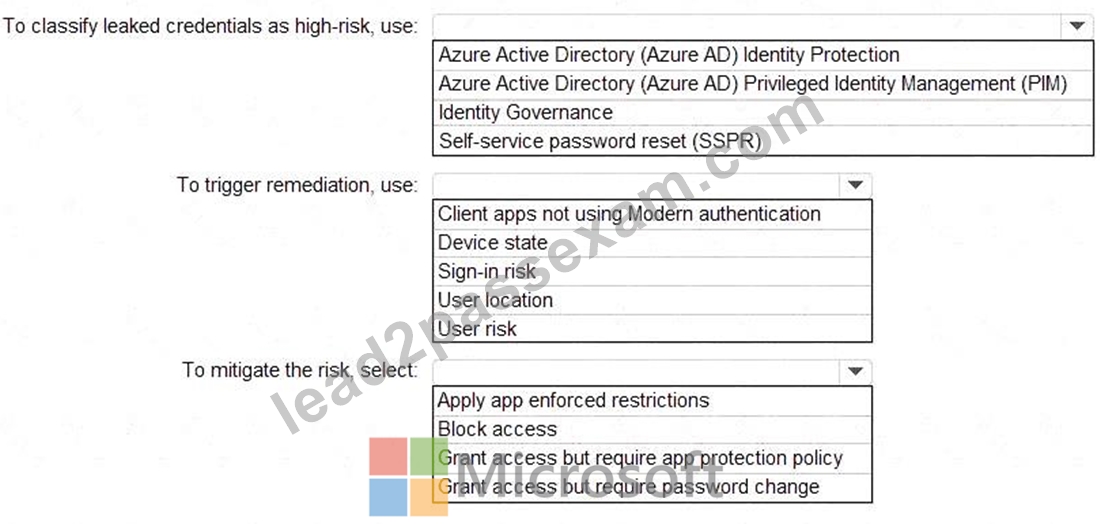
Answer:
Explanation:
Explanation:
According to the Microsoft SC-300: Identity and Access Administra tor Study Guide and the Microsoft Learn module "Implement and manage Azure AD Identity Protection," Azure AD Identity Protection is the service responsible for detecting risky behaviors such as leaked credentials, suspicious sign-ins, and compromised accounts in a Microsoft 365 or Azure AD environment.
1# # Classify leaked credentials as high-risk Identity Protection automatically flags leaked or compromised credentials detected through Microsoft's threat intelligence signals and dark web monitoring. It classifies these users with a high user risk level.
"Identity Protection detects leaked credentials and marks the user risk as high when evidence of compromise is found." Thus, the feature used for this classification is Azure AD Identity Protection.
2# # Trigger remediation Remediation for leaked credentials is driven by User Risk policies. The User risk policy in Identity Protection can automatically respond to users identified as high-risk. This triggers actions such as forcing a password reset.
"User ri sk policy can be configured to respond to risky users by requiring password change or blocking access." Hence, User risk is the correct trigger.
3# # Mitigate the risk To allow users to continue accessing applications after remediation, the proper action is Grant access but require password change. This enforces an immediate credential reset to mitigate the compromise but still allows access once the user remediates their risk.
"To automatically remediate high user risk while maintaining access, configure th e policy to grant access but require a password change."
NEW QUESTION # 172
You have a custom cloud app named App1 that is registered in Azure Active Directory (Azure AD).
App1 is configured as shown in the following exhibit.
Use the drop-down menus to select the answer choice that completes each statement based on the information presented in the graphic.
NOTE:Each correct selection is worth one point.
Answer:
Explanation:
Explanation:
< [answer choice] can access App1 from the homepage URL: # Only users listed on the Users and groups blade App1 will appear in the Microsoft Office 365 app launcher for [answer choice]: # Only users listed on the Users and groups blade
According to Microsoft's official documentation and the SC-300: Microsoft Identity and Access Administrator study guide, when you register and configure an enterprise application in Azure Active Directory, two specific settings directly influence user visibility and access:
* User assignment required?
* If this option is set to Yes, Azure AD requires users to be explicitly assigned to the app before they can sign in.
* Only users or groups listed on the Users and groups blade (app assignments) will have access.
* This means that even if the application is visible in Azure AD, users not assigned to it cannot authenticate or launch it.
* Visible to users?
* If set to Yes, the app appears in the Microsoft 365 app launcher (also known as the My Apps portal).
* However, when "User assignment required" is Yes, the visibility is limited only to those who are assigned to the app.
From the exhibit:
* "User assignment required?" = Yes
* "Visible to users?" = Yes
This configuration implies:
* Only assigned users (those listed on the Users and groups blade) can sign in to App1 via the homepage URL.
* App1 will appear in the Microsoft 365 app launcher (My Apps portal) only for those same assigned users.
As per Microsoft Learn documentation ("Manage enterprise apps in Azure AD"):
"When User assignment required is set to Yes, only users assigned to the application can access it. If Visible to users is also Yes, the application will appear in My Apps for those assigned users."
NEW QUESTION # 173
You have a Microsoft Entra tenant that contains two remote networks named RemoteNetworkl and RemoteNetwork2 and the users shown in the following table.
You have the devices shown in the following table.
Answer:
Explanation:
Explanation:
NEW QUESTION # 174
You have accounts for the following cloud platforms:
* Azure
* Alibaba Cloud
* Amazon Web Services (AWS)
* Google Cloud Platform (GCP)
You configure an A2ure subscription to use Microsoft Entra Permissions Management to manage the permissions in Azure only. Which additional cloud platforms can be managed by using Permissions Management?
- A. Alibaba Cloud and AWS only
- B. Alibaba Cloud, AWS, and GCP
- C. AWS only
- D. AWS and GCP only
- E. Alibaba Cloud and GCP only
Answer: D
Explanation:
To answer this question correctly, we must reference the supported cloud platforms for Microsoft Entra Permissions Management (formerly known as CloudKnox).
1. What is Microsoft Entra Permissions Management? Microsoft Entra Permissions Management is a Cloud Infrastructure Entitlement Management (CIEM) solution. Its primary purpose is to discover, remediate, and monitor permission risks for any identity and any resource across your multi-cloud infrastructure.
2. Supported Cloud Platforms: According to the official Microsoft Entra Permissions Management documentation, the service provides comprehensive visibility and control over permissions for the following specific cloud providers:
* Microsoft Azure
* Amazon Web Services (AWS)
* Google Cloud Platform (GCP)
3. Analysis of the Options:
* Alibaba Cloud: While Microsoft Defender for Cloud (CSPM) and Azure AD (for SSO) have integrations with Alibaba Cloud, Microsoft Entra Permissions Management explicitly supports only the three major public clouds listed above (Azure, AWS, and GCP). It does not currently support Alibaba Cloud for entitlement and permission management.
* The Scenario: You have already configured it for Azure. You need to identify which additional platforms from the list (Alibaba, AWS, GCP) can be managed.
* Conclusion: Since Alibaba Cloud is not supported, the only remaining valid platforms from your list are AWS and GCP.
Reference Extract:
"Microsoft Entra Permissions Management is a cloud infrastructure entitlement management (CIEM) solution that provides comprehensive visibility into permissions assigned to all identities... across cloud infrastructures Microsoft Azure, Amazon Web Services (AWS), and Google Cloud Platform (GCP)."
NEW QUESTION # 175
You need to implement the planned changes and technical requirements for the marketing department.
What should you do? To answer, select the appropriate options in the answer area.
NOTE: Each correct selection is worth one point.
Answer:
Explanation:
Reference:
https://docs.microsoft.com/en-us/azure/active-directory/governance/entitlement-management-organization
NEW QUESTION # 176
You need to meet the planned changes for the User administrator role.
What should you do?
- A. Modify Active Assignments.
- B. Create an access review.
- C. Create an administrator unit.
- D. Modify Role settings
Answer: D
Explanation:
In Azure AD Privileged Identity Management (PIM) for Azure AD roles, the exam materials describe that you tailor how a role (for example, User administrator) is used by editing its Role settings. These settings control activation behavior, including require multi-factor authentication, justification, approval, assignment
/activation durations, and notifications. The guide states that administrators can "configure activation requirements and time-bound eligibility on a per-role basis" and "enforce approval workflows and MFA at activation." Access reviews are used to periodically verify who still needs a role, but they do not implement the operational changes to how the role is activated. Active assignments simply shows and changes who currently holds active/eligible assignments; it does not set policy for the role's activation behavior.
Administrative units scope certain directory tasks, but they are not how you change PIM activation/approval
/MFA requirements. Therefore, to meet planned changes for the User administrator role (such as least privilege activation with approval, justification, and MFA), you update PIM # Azure AD roles # User administrator # Role settings. This aligns with the SC-300 objective to "configure PIM settings and policies for Azure AD roles," ensuring governance by policy rather than ad-hoc assignment.
NEW QUESTION # 177
Your network contains an on-premises Active Directory Domain services (AD DS) domain that syncs with an Azure AD tenant. The AD DS domain contains the organizational units (OUs) shown in the following table.
You need to create a break-glass account named BreakGlass.
Where should you create BreakGlass, and which role should you assign to BreakGlass? To answer, select the appropriate options in the answer area.
NOTE: Each correct selection is worth one point.
Answer:
Explanation:
Explanation:
NEW QUESTION # 178
You have a Microsoft 365 E5 subscription.
You need to configure app consent for the subscription. The solution must meet the following requirements:
* Disable user consent to apps.
* Configure admin consent workflow for apps.
Which portal should you use for each requirement? To answer, select the appropriate options in the answer area. NOTE Each correct selection is worth one point
Answer:
Explanation:
Explanation:
NEW QUESTION # 179
Hotspot Question
You have an Azure Active Directory (Azure AD) tenant that contains a user named User1 and the groups shown in the following table.
In the tenant, you create the groups shown in the following table.
Which members can you add to GroupA and GroupB? To answer, select the appropriate options in the answer area.
NOTE: Each correct selection is worth one point.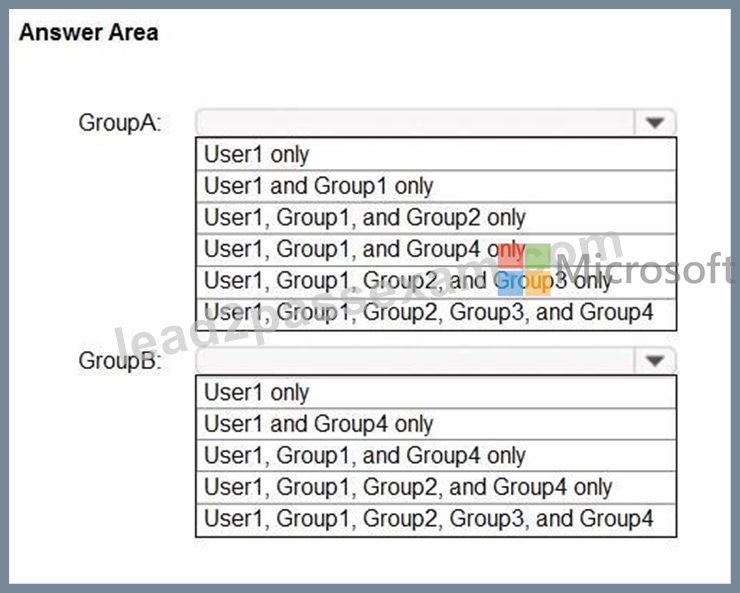
Answer:
Explanation:
Explanation:
Group A - User1, Group1, Group2 and Group3
Group A cannot contain M365 groups.
Group B - User1 only
M365 groups cannot contain other groups.
Reference:
https://docs.microsoft.com/en-us/azure/active-directory/fundamentals/active-directory-groups- membership-azure-portal
NEW QUESTION # 180
You have an Azure subscription that contains the following virtual machine Name: VM1 Azure region: East US System-assigned managed identity: Disabled You create the managed identities shown in the following table.
You perform the following actions:
* Assign Managed1 to VM1.
* Create a resource group named RG1 in the West US region.
For each of the following statements, select Yes if the statement is true. Otherwise, select No.
NOTE: Each correct selection is worth one point.
Answer:
Explanation:
NEW QUESTION # 181
Your network contains an on-premises Active Directory domain that syncs to an Azure Active Directory (Azure AD) tenant. The tenant contains the users shown in the following table.
All the users work remotely.
Azure AD Connect is configured in Azure AD as shown in the following exhibit.
Connectivity from the on-premises domain to the internet is lost.
Which users can sign in to Azure AD?
- A. User1 and User2 only
- B. User1 only
- C. User1 and User3 only
- D. User1, User2, and User3
Answer: C
Explanation:
Reference:
https://docs.microsoft.com/en-us/azure/active-directory/hybrid/how-to-connect-pta-current-limitations
NEW QUESTION # 182
You have an Azure Active Directory (Azure AD) tenant that contains a user named User1.
An administrator deletes User1.
You need to identity the following:
* How many days after the account of User1 is deleted can you restore the account?
* Which is the least privileged role that can be used to restore User1?
What should you identify? To answer, select the appropriate options in the answer area. NOTE: Each correct selection is worth one point.
Answer:
Explanation:
Explanation:
As per the Microsoft Identity and Access Administrator (SC-300) official study guide, and confirmed by Microsoft Learn documentation on "Restore a deleted user in Azure Active Directory", when a user account is deleted from Azure Active Directory (Azure AD), it is not permanently removed immediately. Instead, the deleted user object is retained in a "soft-deleted" state for 30 days. During this retention period, administrators can restore the user account, including its associated group memberships and licenses. After 30 days, the user object is permanently deleted and cannot be recovered.
From the Microsoft documentation:
"When a user is deleted, the account is retained in a deleted state for up to 30 days. You can restore the user within this period using the Azure portal, PowerShell, or Microsoft Graph." Regarding the minimum role required, the same documentation and SC-300 guide state that the User Administrator role is the least privileged built-in Azure AD role that can manage users - including restoring deleted accounts. Higher roles, such as Global Administrator, also have this capability, but the principle of least privilege applies.
"The User Administrator role can create, update, delete, and restore user accounts and reset passwords for non- administrators." Therefore, the correct configuration is:
* Number of days: 30
* Role: User Administrator
NEW QUESTION # 183
Task 7
You need to lock out accounts for five minutes when they have 10 failed sign-in attempts.
Answer:
Explanation:
See the Explanation for the complete step by step solution
Explanation:
To configure the account lockout settings so that accounts are locked out for five minutes after 10 failed sign-in attempts, you can follow these steps:
Open the Microsoft Entra admin center:
Sign in with an account that has the Security Administrator or Global Administrator role.
Navigate to the lockout settings:
Go to Security > Authentication methods > Password protection.
Adjust the Smart Lockout settings:
Set the Lockout threshold to 10 failed sign-in attempts.
Set the Lockout duration (in minutes) to 5.
Please note that by default, smart lockout locks an account from sign-in after 10 failed attempts in Azure Public and Microsoft Azure operated by 21Vianet tenants1. The lockout period is one minute at first, and longer in subsequent attempts. However, you can customize these settings to meet your organization's requirements if you have Microsoft Entra ID P1 or higher licenses for your users
NEW QUESTION # 184
You have a Microsoft Entra tenant that contains a group named Group1 and two users named User1 and User2. User1 is a member of Group1.
You register an enterprise application named App1.
You enable self-service application access for App1 and configure the following settings:
Allow users to request access to this application: Yes
To which group should assigned users be added: Group1
Require approval before granting access to this application: Yes
Who is allowed to approve access to this application: User2
For each of the following statements, select Yes if the statement is true. Otherwise, select No.
Answer:
Explanation: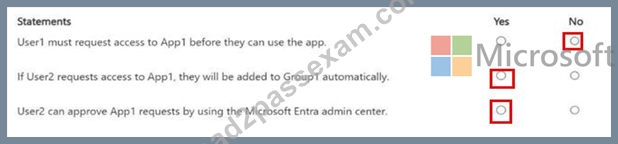
Reference:
Microsoft Entra ID documentation: "Configure self-service application access" (Microsoft Learn:https://learn.microsoft.com/en-us/entra/identity/enterprise-apps/configure-self-service) Microsoft Entra ID documentation: "Manage access requests" (Microsoft Learn:https://learn.microsoft.com/en-us/entra/identity/governance/access-reviews-overview) Microsoft Identity and Access Administrator (SC-300) exam study guide, which covers self-service application access and approval workflows in Microsoft Entra ID.
NEW QUESTION # 185
You have an Azure AD tenant.
You deploy a new enterprise application named App1.
When users attempt to provide App1 with access to the tenant, the attempt fails.
You need to ensure that the users can request admin consent for App1. The solution must follow the principle of least privilege.
What should you do first?
- A. Create a Conditional Access policy for App1.
- B. Enable admin consent requests for the tenant.
- C. Designate a reviewer of admin consent requests for the tenant.
- D. From the Permissions settings of App1, grant App1 admin consent for the tenant.
Answer: B
Explanation:
To ensure that users can request admin consent for App1 in your Azure AD tenant, you should first enable admin consent requests for the tenant.
Enabling admin consent requests allows users to initiate the process of requesting admin consent for applications that require it. By default, users do not have the ability to grant admin consent for applications. Enabling this feature ensures that users can request admin consent for App1 without having to rely on an administrator to initiate the process.
NEW QUESTION # 186
Your network contains an on-premises Active Directory domain that syncs to an Azure Active Directory (Azure AD) tenant. The tenant contains the users shown in the following table.
All the users work remotely.
Azure AD Connect is configured in Azure AD as shown in the following exhibit.
Connectivity from the on-premises domain to the internet is lost.
Which users can sign in to Azure AD?
- A. User1 and User2 only
- B. User1 only
- C. User1 and User3 only
- D. User1, User2, and User3
Answer: D
Explanation:
The exhibit shows Password Hash Synchronization (PHS) enabled and Pass-through Authentication (PTA) enabled. The SC-300 materials clarify that when both PTA and PHS are enabled, Azure AD can fall back to PHS if PTA agents become unavailable. The guidance states that PHS can serve as a backup sign-in method to ensure continuity during on-premises connectivity failures. In this scenario, on-premises connectivity to the internet is lost, so PTA agents cannot process sign-ins. Because PHS is enabled, synchronized users can still authenticate in Azure AD using their synced password hashes.
* User1 is a cloud-only user and authenticates directly in Azure AD-unaffected by on-premises outages.
* User2 is directory-synced; with PTA down, sign-in falls back to PHS, allowing access as long as the hash is present.
* User3 is a guest; guests authenticate in their home directory/IdP, independent of your on-premises environment, so they can still sign in.Therefore, during the outage, all three users (User1, User2, and User3) can sign in to Azure AD, satisfying the behavior described in the SC-300 documentation regarding PHS backup for PTA and guest sign-in independence.
NEW QUESTION # 187
You have an Azure AD tenant that contains multiple storage accounts.
You plan to deploy multiple Azure App Service apps that will require access to the storage accounts.
You need to recommend an identity solution to provide the apps with access to the storage accounts. The solution must minimize administrative effort.
Which type of identity should you recommend, and what should you recommend using to control access to the storage accounts? To answer, select the appropriate options in the answer area.
Answer:
Explanation:
Explanation:
A screenshot of a computer Description automatically generated
NEW QUESTION # 188
Note: This question is part of a series of questions that present the same scenario. Each question in the series contains a unique solution that might meet the stated goals. Some question sets might have more than one correct solution, while others might not have a correct solution.
After you answer a question in this section, you will NOT be able to return to it. As a result, these questions will not appear in the review screen.
You have a Microsoft 365 tenant.
You have 100 IT administrators who are organized into 10 departments.
You create the access review shown in the exhibit. (Click theExhibittab.)
You discover that all access review requests are received by Megan Bowen.
You need to ensure that the manager of each department receives the access reviews of their respective department.
Solution: You create a separate access review for each role.
Does this meet the goal?
- A. Yes
- B. NoD18912E1457D5D1DDCBD40AB3BF70D5D
Answer: B
Explanation:
Reference:
https://docs.microsoft.com/en-us/azure/active-directory/governance/create-access-review
NEW QUESTION # 189
......
Microsoft SC-300 (Microsoft Identity and Access Administrator) Exam is a certification exam designed for IT professionals who want to validate their skills in managing identity and access solutions in a Microsoft environment. SC-300 exam is part of the Microsoft Certified: Identity and Access Administrator Associate certification, which is a popular choice for IT professionals who specialize in security and identity management.
The SC-300 exam measures the candidate's knowledge and skills in various areas, including identity management, authentication and authorization, access management, and security. Candidates who pass the exam earn the Microsoft Certified: Identity and Access Administrator Associate certification, which demonstrates their expertise in identity and access management solutions. Microsoft Identity and Access Administrator certification is highly valued in the IT industry and is an excellent way to showcase your skills and knowledge in managing identity and access solutions in Microsoft environments.
Prepare Top Microsoft SC-300 Exam Audio Study Guide Practice Questions Edition: https://theexamcerts.lead2passexam.com/Microsoft/valid-SC-300-exam-dumps.html